

Migrating from Gmail or Google Workspace to Microsoft 365 sounds daunting – but done correctly it is a background process your staff barely notice. Here is exactly how we do it for Malaysian businesses.
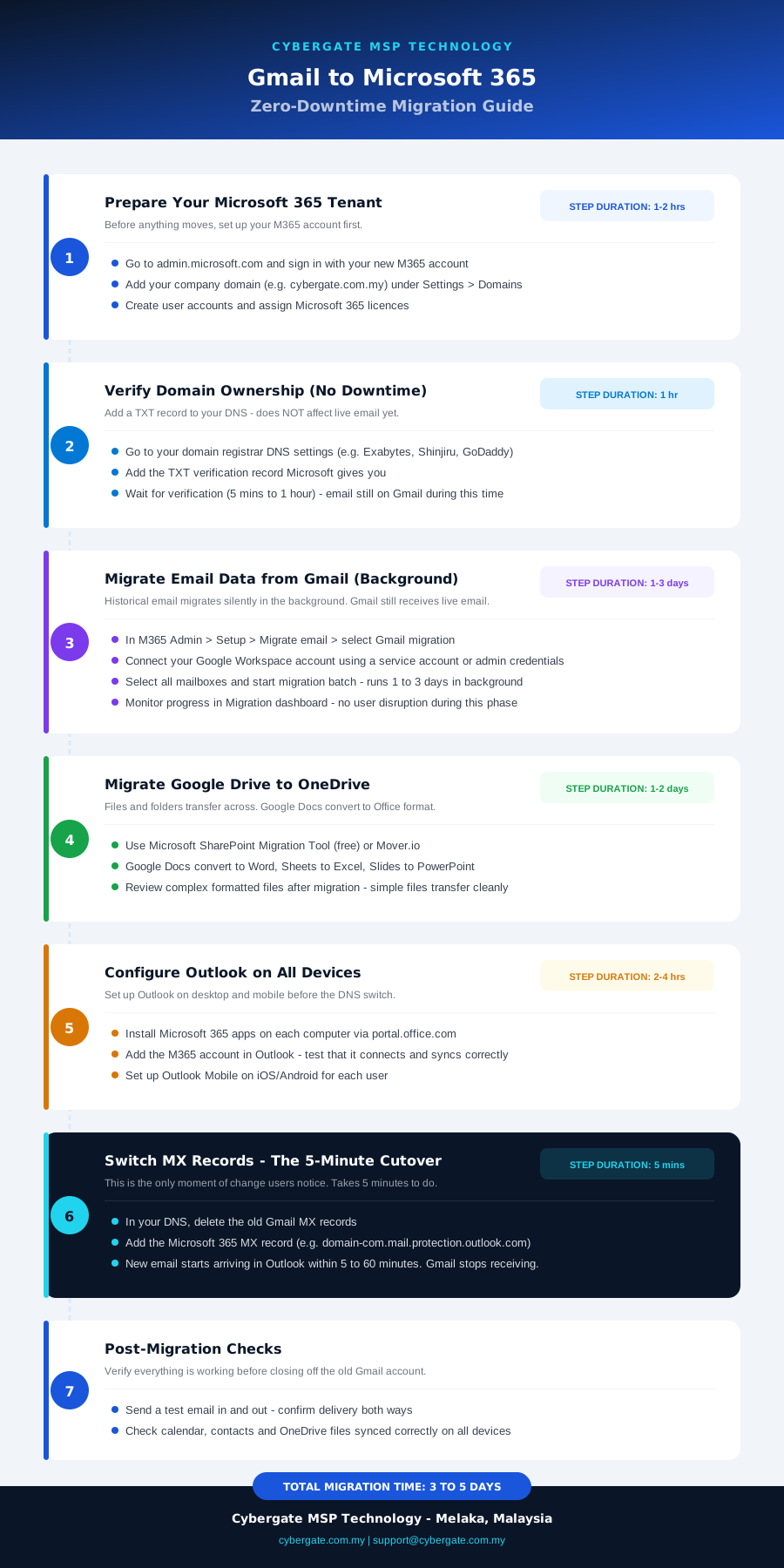
Gmail to Microsoft 365 migration steps – Cybergate MSP Technology Malaysia
Before You Start – What to Prepare
- Take stock of all mailboxes, shared inboxes and distribution lists
- Identify which staff need full desktop Office and which only need web access
- Check your domain DNS – you will need access to change MX records
- Choose your Microsoft 365 plan (Basic, Standard or Premium)
- Communicate the migration timeline to staff in advance
A proper migration keeps both Google and Microsoft 365 running simultaneously during the transition period. Staff continue receiving and sending email on Google while we migrate historical data in the background. The DNS cutover is a 5-minute change that switches new mail to Microsoft 365.
Migration Methods Explained
There are three main approaches depending on your setup:
- IMAP migration: Migrates mail only (not calendar or contacts). Good for small teams wanting a clean start. We use Google Takeout or direct IMAP to pull mailbox content into Exchange Online.
- Google Workspace migration tool: Microsoft’s native tool migrates mail, calendar and contacts from Google Workspace. More complete but requires admin access to both platforms.
- Third-party migration tool (BitTitan MigrationWiz): Best for large migrations. Handles mail, calendar, contacts and OneDrive simultaneously with scheduling and progress tracking.
Step-by-Step Migration Process
Provision Microsoft 365 tenant and add domain
Create your M365 tenant, add your company domain and verify ownership via a DNS TXT record. Takes about 30 minutes.
Create all user accounts and assign licences
Set up all mailboxes in M365 with temporary passwords. Each user gets their company@yourdomain.com.my address in Exchange Online.
Begin background migration of historical mail
Start migrating existing email, calendar and contacts from Google to Exchange Online. This runs in the background over 12 to 48 hours depending on mailbox sizes.
Staff set up Microsoft 365 apps on devices
While migration runs, staff install Outlook and other apps on their computers and phones. They log in but keep using Gmail until cutover day.
DNS MX record cutover
Change your DNS MX records to point to Microsoft 365. New emails now arrive in Exchange Online. Takes 5 minutes to change; propagates globally within 1 to 4 hours.
Final sync and decommission Google
Run a final delta sync to capture any emails that arrived in Google during migration. Verify all staff are operational on M365, then close Google Workspace billing.
What Gets Migrated
| Item | Migrates? | Notes |
|---|---|---|
| Email (inbox, sent, folders) | Yes – fully | All historical email including folder structure |
| Calendar events | Yes | Including recurring events and attendees |
| Contacts | Yes | Personal contacts migrate to Outlook People |
| Google Drive files | Partial | Converted to OneDrive; formatting may vary on complex Docs |
| Google Meet recordings | No | Download separately before migration |
| Gmail labels | As folders | Labels become Outlook folders |
| Shared drives | Yes | Migrated to SharePoint document libraries |
How Long Does a Migration Take?
Common Issues and How to Avoid Them
- MX record TTL too high: Lower your DNS TTL to 300 seconds 24 hours before cutover to ensure fast propagation
- SPF/DKIM not configured on new tenant: Set up SPF, DKIM and DMARC on M365 before cutover to avoid outgoing mail landing in spam
- Staff still have Gmail app open: Clear this up on cutover day – old app will stop receiving new mail but may confuse staff
- Large mailboxes taking too long: Archive old mail in Google before migration to reduce volume; migrate only last 2 years for large mailboxes