
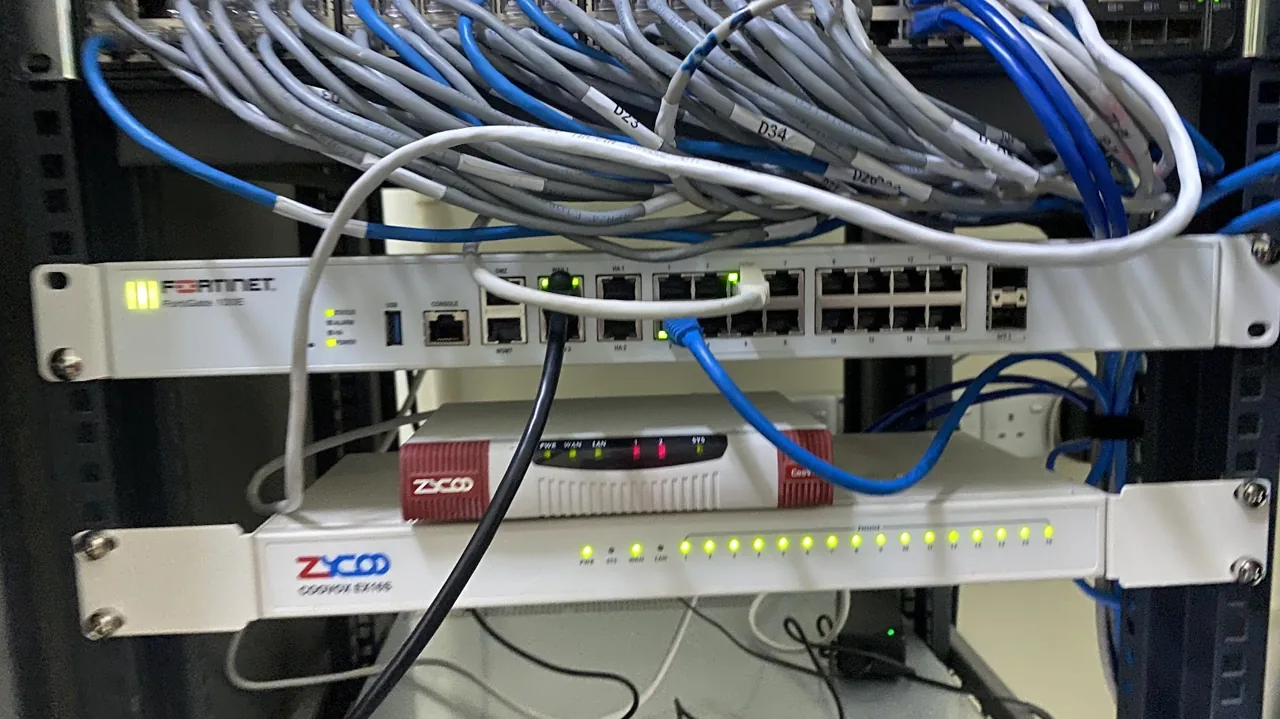
A business firewall is a dedicated security device that sits between your office network and the internet, inspecting traffic to block attacks, malware and unauthorised access. Yes, almost every Malaysian SME needs one. The basic router from your internet provider was built for connectivity, not protection, and it cannot stop modern threats like ransomware, phishing payloads or intrusion attempts. A proper next-generation firewall gives you real defence, content control and the audit trail you need for PDPA.
What a Business Firewall Actually Does
A firewall is the gatekeeper for your office network. Every piece of data that travels between your computers and the internet passes through it, and the firewall decides what is allowed and what is blocked. Think of it as a security guard at the front door of your business who checks everyone coming in and going out against a set of rules. Without that guard, anyone on the internet can knock on your network and some of them are not friendly.
Modern business firewalls do far more than simple traffic filtering. They inspect the contents of data packets, recognise known attack patterns, block malicious websites, scan for viruses and stop suspicious connections before they reach your staff. A good firewall is the single most important piece of network security hardware in a small office, and it quietly works around the clock whether anyone is watching or not.
For a Malaysian SME, the firewall is also where a lot of practical control happens. You can limit access to risky websites, give guests a separate Wi-Fi network, prioritise your accounting or video call traffic, and create a secure tunnel for staff who work from home. It is both a shield and a control panel for how your business uses the internet.
Why a Home Router Is Not Enough for Your Office
The router your internet provider hands over when you sign up for Unifi or Maxis Fibre is built to do one job well: get you online. It has a basic firewall built in, but that feature is closer to a latch than a lock. It blocks unsolicited inbound connections and little else. It does not inspect the actual content of traffic, it does not scan for malware, and it has no real way to detect or stop a targeted attack.
Consumer routers also age badly. Many never receive security updates after the first year, which means known vulnerabilities stay open forever. Attackers actively scan the internet for these exact models. When a router is compromised, every device behind it is exposed, and you usually have no logs to even know it happened. For a business holding customer data, that is a serious gap.
A business firewall is designed for a different world. It receives regular threat updates, keeps detailed logs, supports multiple network segments and is built to run continuously under load. If your office has more than a handful of staff, processes payments, or stores any personal data, the jump from a provider router to a proper firewall is one of the highest-value security investments you can make. Our team covers this during any [cybersecurity](/cybersecurity/) review.
Firewall Types: From Basic to Next-Generation
Firewalls have evolved over decades, and the terms can get confusing. A traditional or packet-filtering firewall looks only at where traffic is coming from and going to, plus which port it uses. It is fast but blind to what is actually inside the traffic. This is roughly what your home router offers, and it is no longer enough on its own.
A stateful firewall is a step up. It tracks the state of active connections and makes smarter decisions about what belongs to a legitimate conversation and what does not. Most business-grade devices have included stateful inspection for years, so this is now a baseline expectation rather than a premium feature.
A next-generation firewall, or NGFW, is what most Malaysian SMEs should be buying today. An NGFW combines stateful inspection with deep packet inspection, application awareness, intrusion prevention and the ability to decrypt and scan encrypted web traffic. It can tell the difference between someone browsing a normal website and malware quietly trying to phone home, and it acts on that difference automatically.
UTM Explained: One Box, Many Protections
UTM stands for Unified Threat Management, and it is the approach that makes the most sense for a small business. Instead of buying separate appliances for the firewall, antivirus gateway, web filter, spam filter and VPN, a UTM device bundles all of these into one box with one management screen. For an SME without a large IT team, that consolidation is a huge practical advantage.
The appeal is simplicity and cost. One device, one licence to renew, one place to check logs and one vendor to call when something needs attention. The trade-off is that everything depends on a single appliance, so sizing it correctly matters, and you should always pair it with a tested [backup and disaster recovery](/backup-disaster-recovery/) plan in case the hardware ever fails.
A typical UTM rolls together the following protections in one unit:
- Firewall and intrusion prevention to block attacks at the perimeter
- Gateway antivirus that scans downloads before they reach a PC
- Web and content filtering to block risky or time-wasting sites
- Application control to manage what software can use the network
- VPN for secure remote and branch access
- Spam and email filtering on supported plans
Key Firewall Features Malaysian SMEs Should Look For
Not every feature matters equally for a small office. The goal is real protection without paying for capacity you will never use. When we help a client choose a firewall, we focus on the features that prevent the attacks SMEs actually face, which are overwhelmingly ransomware, phishing and credential theft rather than exotic nation-state tools.
Here are the features worth prioritising for a Malaysian SME:
- Next-generation inspection with intrusion prevention switched on, not just bought
- SSL or HTTPS inspection, since most web traffic and most threats are now encrypted
- Web content filtering by category to block malware and adult or risky sites
- Application control to manage cloud apps and shadow IT
- SSL VPN or IPsec VPN for work-from-home staff and branch offices
- Centralised logging and reporting you can show during an audit
- High availability options if downtime would seriously hurt the business
Two features deserve special mention. SSL inspection is now essential because if your firewall cannot look inside encrypted traffic, it is effectively blind to the majority of modern threats. And logging matters more than most owners realise, because when something goes wrong, the logs are how you find out what happened and prove what data was or was not touched.
How a Firewall Fits Into Layered Security
A firewall is powerful, but it is not a magic wall that makes you invulnerable. Security works in layers, and the firewall is the outermost one. It controls the boundary between your network and the wider internet, which is the right place to stop a lot of trouble before it ever gets near your staff or servers.
Behind the firewall you still need protection on the devices themselves. Endpoint security, patching and device management catch threats that arrive by other routes, such as a USB stick, a personal laptop or an email attachment opened on the move. We typically pair a firewall with a managed endpoint platform like [ManageEngine Endpoint Central](/manageengine-endpoint-central-cloud/) so that every PC stays patched and monitored.
The other essential layers are people and recovery. Staff who can spot a phishing email stop attacks the firewall never sees, and a tested backup means that even a successful ransomware hit becomes an inconvenience rather than a disaster. A firewall buys you a strong perimeter, but the businesses that stay safe treat it as part of a complete plan, not the whole plan.
Firewalls and PDPA Compliance in Malaysia
Malaysia's Personal Data Protection Act requires businesses to take practical steps to keep personal data secure. A firewall is one of the clearest ways to demonstrate that you have a reasonable technical safeguard in place. It controls who can reach your systems, blocks known attacks and keeps a record of network activity, all of which support the security principle at the heart of the PDPA.
The 2025 and 2026 updates to the PDPA raised expectations further, including breach notification duties. If you ever suffer an incident, regulators and affected customers will ask what protections you had and what your logs show. A firewall that has been properly configured and is actively logging gives you real answers instead of guesswork, which makes a tense situation far more manageable.
Compliance is never a single product, but a business-grade firewall is a foundation you can build on. Combined with access controls, staff training and encryption on your key systems, it forms a credible security posture. If you are unsure where you stand, a short review with our [IT support team](/it-support-and-outsourcing/) can map your current setup against what the PDPA expects.
Choosing the Right Firewall Size for Your Business
Firewalls are sized by throughput, which is how much traffic they can inspect per second once all the security features are switched on. This is the single most common sizing mistake we see. An owner buys an entry-level model based on its headline firewall speed, then turns on inspection and antivirus and finds the real-world performance drops sharply, slowing the whole office down.
The right size depends on your number of users, your internet speed and how much heavy traffic you push, such as cloud backups, video calls and large file transfers. A five-person office on a 300 Mbps line has very different needs from a thirty-person company running servers and a busy e-commerce site. Buying slightly above your current needs gives you headroom for growth and for future features.
It is also worth thinking two or three years ahead. Staff counts grow, internet plans get faster, and you will likely add more cloud services over time. A firewall that is comfortably sized today but maxed out tomorrow is a false economy. We size every firewall against both current load and realistic growth so the device serves you for its full lifespan.
Popular Firewall Brands for Malaysian SMEs
Several established brands dominate the small-business firewall market, and most are solid choices when sized and configured correctly. The differences come down to feature mix, ease of management, local support availability and the total cost once licences are included. There is no single best brand, only the best fit for a particular business.
These are the options we see most often in Malaysian SMEs:
- Fortinet FortiGate, a popular and capable NGFW range with strong performance and wide local support
- Sophos, known for a clean management interface and tight integration with endpoint protection
- SonicWall, a long-standing SME favourite with a broad model line-up
- Cisco and Cisco Meraki, strong in cloud-managed networking for multi-site businesses
- WatchGuard and Zyxel, both common in the value and small-office segment
Brand matters less than the three things around it: correct sizing, proper configuration and ongoing management. A mid-range firewall set up well and kept updated will outperform a premium model that was installed and forgotten. We stay brand-flexible and recommend whatever genuinely suits the client, the budget and the support reality on the ground.
What Firewall Setup Involves
Buying the box is the easy part. The protection comes from configuration, and a firewall taken out of the carton with factory defaults provides only a fraction of its potential. Proper setup starts with understanding how the business actually works, which systems must be reachable, who needs remote access and what should never be allowed out of the network.
A typical deployment includes defining security zones, writing firewall rules on a deny-by-default basis, enabling intrusion prevention and web filtering, configuring SSL inspection, setting up VPN access for remote staff and separating guest Wi-Fi from the main network. Each of these steps needs to match the real workflow of the office, which is why a template configuration rarely fits well.
This is hands-on work that benefits from being done on site, especially for the physical cabling, failover and testing. Our [onsite IT support](/onsite-it-support/) team handles firewall installation across the Klang Valley, and onsite visits for servers, firewalls and NAS start at a higher first-hour rate. Getting the setup right once saves a great deal of trouble later.
Firewall Licensing and Subscription Costs
A firewall has two cost components that owners often miss when comparing prices. The first is the hardware itself, a one-off purchase. The second is the security subscription, an annual licence that keeps the threat intelligence, antivirus signatures, web filtering and intrusion prevention up to date. Without an active licence, the advanced features stop updating and your protection slowly goes stale.
This subscription model is normal and worth budgeting for from day one. The licence is what turns a static box into a living defence that recognises this week's threats, not last year's. Letting it lapse is one of the quieter risks we encounter, because the firewall keeps running and looks fine while its actual protective value quietly drops behind the current threat landscape.
When planning a firewall purchase, always cost the device plus three years of licensing together so there are no surprises at renewal. For many SMEs it makes sense to fold the firewall, its licence and ongoing management into a [managed IT support](/it-support-and-outsourcing/) plan, which is on a monthly retainer, so that updates, monitoring and renewals are simply handled rather than forgotten.
Common Firewall Mistakes That Leave You Exposed
Owning a firewall and being protected by one are not the same thing. We regularly find firewalls that are present but contributing little, usually because of a handful of avoidable mistakes. The good news is that every one of these is fixable, often in a single configuration session.
The most common firewall mistakes we see in the field include:
- Leaving the default admin password unchanged, which is the first thing attackers try
- Buying advanced features but never enabling intrusion prevention or web filtering
- Letting the security subscription expire so threat updates stop
- Opening too many inbound ports for convenience, widening the attack surface
- Skipping SSL inspection, leaving most encrypted threats invisible
- Never checking the logs, so a quiet compromise goes unnoticed for months
- Exposing remote desktop directly to the internet instead of behind a VPN
That last point deserves emphasis. Exposing Remote Desktop Protocol straight to the internet is one of the leading causes of ransomware infections in small businesses. If staff need remote access, it belongs behind a VPN on the firewall, never as an open door. A short configuration review can close all of these gaps quickly.
Firewalls for Work-From-Home and Remote Access
Hybrid and remote work are now normal for many Malaysian SMEs, and the firewall is central to doing it securely. The standard approach is a VPN, a Virtual Private Network, which creates an encrypted tunnel between a remote worker's laptop and the office network. To anyone watching the connection, the traffic is unreadable, and the staff member works as if they were sitting at their desk.
Most business firewalls include VPN capacity, either SSL VPN through a browser or client, or IPsec for site-to-site links between branches. Setting this up correctly means strong authentication, ideally with multi-factor authentication, limited access to only the systems each person needs, and proper logging of who connected and when. Done well, remote access adds flexibility without widening your risk.
The wrong way to enable remote work is to open services directly to the internet without a VPN, which is unfortunately still common. A firewall configured with a proper VPN gives you the convenience of remote access while keeping the perimeter intact. If your team works from home, our [IT support](/it-support-and-outsourcing/) engineers can set up secure VPN access alongside Microsoft 365 or [Google Workspace](/google-workspace/).
Managing and Monitoring Your Firewall Over Time
A firewall is not a set-and-forget appliance. Threats change constantly, your business changes, and the firewall needs to keep pace. Ongoing management means applying firmware updates, reviewing and tidying rules, watching the logs for unusual activity and adjusting policies as staff, systems and cloud services come and go. A firewall left untouched for two years is rarely still doing its best work.
Monitoring is where a lot of real value sits. The logs record connection attempts, blocked attacks, sites visited and VPN sessions, and reviewing them turns the firewall from a silent box into an early warning system. A sudden spike in blocked traffic or an odd outbound connection at 3am is exactly the kind of signal that lets you act before a small problem becomes a breach.
Few small businesses have the time or in-house skill to do this consistently, which is where managed firewall management earns its keep. Folding the firewall into a [managed IT support](/it-support-and-outsourcing/) plan means updates, log reviews and tuning happen on a schedule instead of whenever someone remembers. For Shah Alam and Klang Valley businesses, our [local IT support](/it-support-shah-alam/) team can do this on a regular cadence.
When to Replace or Upgrade Your Firewall
Firewalls have a working lifespan, usually around five to seven years, after which they should be replaced rather than stretched. The clearest signal is end-of-life status from the manufacturer, which means no more firmware or security updates. Running an unsupported firewall is like keeping a guard who has stopped learning about new threats, and attackers know which old models to look for.
Performance is the other common trigger. As your internet speed climbs and you switch on more inspection features, an older or undersized firewall starts to become a bottleneck. If web pages crawl, video calls stutter or backups never finish, the firewall may simply be out of capacity. That is a sign to upgrade rather than disable the protection that is slowing you down.
Business change also drives upgrades. Opening a second branch, doubling your headcount, moving heavily to the cloud or starting to handle more sensitive data can all push you beyond what your current device was sized for. A quick assessment tells you whether your firewall still fits, and we are happy to review yours as part of a broader [cybersecurity](/cybersecurity/) check.
Firewall Buying and Deployment Checklist
If you are about to buy or replace a firewall, working through a short checklist keeps you from the common traps. The aim is a device that fits your real traffic, is configured properly and is kept current, rather than the most expensive box on the shelf or the cheapest one that ticks a box on paper.
Use this checklist before you commit:
- Count your users and confirm your internet speed so the device is sized for real load with inspection on
- Choose a next-generation firewall with intrusion prevention and web filtering
- Confirm it supports SSL inspection and the VPN type your staff need
- Budget for the hardware plus at least three years of security licensing
- Plan a proper configuration, not factory defaults, ideally onsite
- Change the admin password and lock down remote management
- Decide who will update, monitor and review it over time
- Pair it with endpoint protection and a tested backup
If any of these steps feel uncertain, that is normal, and it is exactly the kind of work a good IT partner handles for you. The difference between a firewall that protects and one that just sits in the rack is almost always in the planning and the follow-through, not the brand on the front.
Key Takeaways
A business firewall is the most important piece of network security hardware for a Malaysian SME, and the basic provider router is not a substitute. The right device for most small offices is a next-generation firewall or UTM, sized for real traffic with inspection enabled, and kept current with an active security subscription.
The headline points to remember:
- A provider router protects connectivity, not your business, so add a proper firewall
- Buy a next-generation firewall and actually enable intrusion prevention, web filtering and SSL inspection
- Size for real load with all features on, plus room to grow
- Budget for hardware and three years of licensing together
- Put remote access behind a VPN, never expose Remote Desktop directly
- A firewall is one layer, so pair it with endpoint security, training and backup
- Keep it updated, monitored and reviewed, ideally under a managed plan
Get those fundamentals right and a firewall becomes a quiet, reliable shield for your whole operation. If you would like help choosing, installing or managing one, our team in Shah Alam and Melaka is ready to advise on the option that genuinely fits your business and budget.
Need help with this?
Cybergate provides IT support, cybersecurity, Microsoft 365 and SEO for Malaysian businesses. Free consultation, no obligation.
Get Free Consultation WhatsApp UsKartik Periasamy
Kartik Periasamy is the founder of Cybergate Technology Malaysia, with more than 13 years in IT and technology including a Subject Matter Expert role at Dell. He now leads SEO, AI search and web strategy for businesses across Malaysia and Singapore.