
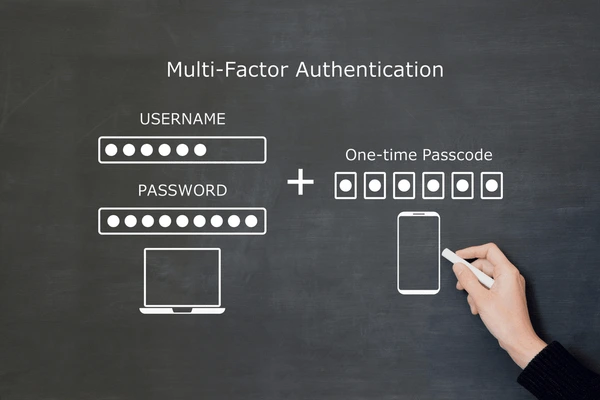
Multi-factor authentication (MFA) means a login needs more than just a password, usually a second proof such as a code from an app on your phone. It matters because passwords get stolen, guessed or phished every day, and a second factor stops most account takeovers cold. For any Malaysian SME using Microsoft 365, Google Workspace, online banking or remote access, MFA is one of the cheapest and most effective security controls you can turn on. Yes, your business needs it, and you can switch it on this week.
What Multi-Factor Authentication Actually Means
Multi-factor authentication, usually shortened to MFA, is a simple idea wrapped in an intimidating name. Instead of letting anyone log in with just a password, the system asks for a second piece of proof that you are really you. That second proof is normally a one-time code from an app on your phone, a tap on a notification, or a physical security key. Even if a criminal steals your password, they still cannot get in without that second factor sitting in your pocket.
Security people talk about three categories of proof: something you know (a password or PIN), something you have (a phone or security key) and something you are (a fingerprint or face scan). MFA simply means combining at least two of these categories. Two-factor authentication, or 2FA, is the most common version and the terms are often used interchangeably. For a Malaysian SME, the practical takeaway is that one stolen password should never be enough to open the front door.
The reason this matters so much is that passwords are the weakest part of nearly every business. People reuse them across sites, write them on sticky notes, and fall for convincing fake login pages. MFA accepts that passwords will leak and builds a second wall behind them. It is not perfect, but it turns a one-step break-in into a much harder two-step problem that most attackers will not bother to solve.
Why Passwords Alone Are No Longer Enough
Every week, billions of stolen username and password pairs circulate on the dark web from old data breaches. If one of your staff used their work email and a favourite password to sign up for a shopping site that later got hacked, that exact combination may already be for sale. Attackers run these lists against Microsoft 365 and Google Workspace logins automatically, a technique called credential stuffing, hoping someone reused the same password at work.
Phishing makes the problem worse. A well-made fake login email can trick even careful staff into typing their password into a lookalike page. Once that happens, the attacker has a valid password and can read email, reset other accounts and impersonate the business to suppliers and customers. We cover real local examples in our guide to phishing for Malaysian SMEs, and the pattern is always the same: the password was the only lock, and it failed.
MFA breaks this chain. A stolen or phished password on its own becomes close to useless because the attacker still needs the second factor. Microsoft has reported that enabling MFA blocks the overwhelming majority of automated account-takeover attempts. For a small business that cannot afford a full security team, that single setting delivers more protection per ringgit than almost anything else you can buy.
The Main Types of MFA Explained Simply
Not all MFA is equal, and the method you choose changes both security and convenience. The most common options for SMEs are SMS codes, authenticator apps, push notifications and hardware security keys. Each has a place, and many businesses use a mix depending on the role and the risk. Understanding the differences helps you avoid the weakest option and pick something your team will actually use without complaining.
Here is a quick comparison of the main methods, from most basic to most secure:
- SMS or email codes: a one-time code sent by text or email. Easy to use but the weakest, because SIM swapping and email hijacking can intercept the code.
- Authenticator apps: apps like Microsoft Authenticator or Google Authenticator generate a fresh six-digit code every 30 seconds. Free, reliable and much stronger than SMS.
- Push notifications: instead of typing a code, you approve a prompt on your phone with one tap. Convenient and popular, but watch out for approving prompts you did not start.
- Hardware security keys: small USB or tap devices such as YubiKey that are nearly impossible to phish. Ideal for owners, finance and admin accounts.
For most Malaysian SMEs, an authenticator app or push notification hits the sweet spot of strong protection and easy daily use. SMS is acceptable as a fallback when nothing else works, but it should not be your main method for important accounts. We help clients choose and roll out the right mix as part of our managed IT support, matching the method to the sensitivity of each account.
Authenticator Apps vs SMS Codes
SMS codes feel convenient because everyone already has a phone number, but they carry a real weakness. Criminals can perform a SIM swap, convincing a mobile provider to move your number to their own SIM card, after which every code meant for you arrives on their device. SMS messages can also be intercepted on compromised networks. For a casual personal account this risk is small, but for business email and banking it is a gap worth closing.
Authenticator apps solve this neatly. The code is generated on the device itself using a shared secret, so nothing travels over the mobile network that an attacker can grab. The app keeps working even with no signal or no SIM, which is handy when staff travel or work from a coffee shop. Microsoft Authenticator and Google Authenticator are both free, and one app can hold codes for dozens of different services at once.
Our usual advice for Klang Valley businesses is to move important accounts off SMS and onto an authenticator app as the default, keeping SMS only as an emergency backup. The switch takes a few minutes per account and costs nothing. It is one of the simplest upgrades that meaningfully reduces your risk of a takeover, especially for the owner and finance staff whose accounts attackers want most.
MFA and Microsoft 365
If your business runs on Microsoft 365, you already have everything you need to deploy MFA at no extra cost. Microsoft provides security defaults and Conditional Access policies that let you require a second factor for every user, and the free Microsoft Authenticator app handles the prompts. Turning this on across your tenant is one of the highest-impact steps you can take, and it protects email, Teams, SharePoint and OneDrive all at once.
The recommended setup for most SMEs is to enforce MFA for all users, then layer on sensible rules such as not re-prompting trusted office devices too often so the experience stays smooth. Admin accounts deserve the strongest protection because they can change settings for everyone, so those should use an authenticator app or a hardware key, never SMS. You can read more about hardening your tenant in our Microsoft 365 cloud guide.
A common worry is that MFA will annoy staff with constant prompts. In practice, modern Microsoft 365 MFA is smart about when to ask, often only challenging users on new devices, new locations or risky sign-ins. Once it is configured well, most people see a prompt only occasionally. We routinely set this up for clients as part of onboarding so the protection is strong and the daily friction is low.
MFA and Google Workspace
Google Workspace offers the same protection under the name 2-Step Verification, and it is just as important to switch on. From the admin console you can enforce 2-Step Verification for everyone, choose which methods are allowed, and even require the more secure options for sensitive groups such as finance or management. Google Authenticator, the Google prompt and hardware keys are all supported, giving you flexibility across different staff.
We generally recommend enforcing 2-Step Verification with a grace period so staff have time to enrol their phones before the requirement kicks in. Blocking the weakest methods for admin accounts is wise, since those accounts control your whole domain. If your business runs on Gmail, Drive and Google Meet, this single policy closes the biggest door attackers use. Our Google Workspace support covers the full rollout and staff guidance.
One advantage of Google Workspace is the built-in Google prompt, which sends a clean tap-to-approve notification to enrolled phones. It is fast for daily use and stronger than SMS. For owners and anyone handling money or customer data, we still suggest pairing it with a hardware key for the accounts that matter most. The goal is the same as with Microsoft 365: make a stolen password worthless on its own.
MFA, PDPA and Your Legal Duties
Malaysia's Personal Data Protection Act, the PDPA, requires businesses that handle personal data to take practical security steps to protect it. While the Act does not name MFA specifically, regulators and auditors increasingly view strong authentication as a basic, expected control. If customer records leak because a single phished password opened your email, it becomes very hard to argue you took reasonable security measures.
Recent updates to the PDPA have tightened expectations around breach handling and accountability, including data breach notification duties. Enabling MFA is part of showing that your business takes data protection seriously and tries to prevent incidents before they happen. It is the kind of low-cost, high-value control that demonstrates good faith to regulators, insurers and customers alike. You can learn more in our overview of PDPA compliance and cybersecurity.
Beyond the law, there is a reputation dimension. If a Selangor or Melaka business suffers a public account takeover that exposes client data, the damage to trust often outlasts any fine. Customers want to know their information is handled carefully. Being able to say that every staff login is protected by MFA is a simple, honest statement that reassures the people who rely on you.
How MFA Protects Against Common Attacks
The biggest threat MFA defends against is account takeover, where an attacker uses a stolen password to log in as your staff. Without MFA, that password is the only barrier, and once it is gone the attacker has full access. With MFA in place, the same stolen password fails at the second step, and you often get an alert that someone tried to use it. That early warning lets you reset the password before any harm is done.
MFA also blunts large-scale automated attacks. Criminals run software that tries millions of leaked passwords against business logins around the clock. These bots have no way to satisfy a second factor, so MFA quietly defeats the entire category. The same applies to many phishing campaigns, where the attacker captures a password but cannot capture the live code or push approval fast enough to use it.
It is important to be honest about the limits too. Determined attackers have ways to try to defeat weaker MFA, such as bombarding a user with push prompts hoping they tap approve out of frustration. This is why method choice and a little staff awareness matter. Pairing MFA with the wider protections in our cybersecurity services, such as endpoint security and email filtering, gives you defence in depth rather than a single line.
A Simple Step-by-Step Rollout Plan
Rolling out MFA does not need to be a giant project. The trick is to start with the accounts that matter most and expand from there, so you get the biggest risk reduction early. A staged plan also gives staff time to adjust, which keeps complaints down and adoption high. Most SMEs can complete a full rollout within one to two weeks without disrupting daily work.
Here is a practical sequence we use with clients:
- Step 1: Protect the owner and admin accounts first, using an authenticator app or hardware key.
- Step 2: Enable MFA for finance and anyone who handles money, customer data or banking.
- Step 3: Roll out to all remaining staff with a short enrolment window and clear instructions.
- Step 4: Add backup methods and recovery codes so nobody gets locked out.
- Step 5: Review the settings, block weak methods for sensitive accounts and document the policy.
Communication makes the difference between a smooth rollout and a flood of help desk tickets. A short message explaining why MFA is being introduced, with simple screenshots, goes a long way. If your team is stretched, our onsite and remote IT support can run the enrolment for you, sitting with staff to set up their phones and confirm everything works before the requirement goes live.
Backup Codes and Avoiding Lockouts
The most common fear about MFA is getting locked out, and it is a fair one. If someone loses their phone or gets a new one, they need a way back into their accounts. The answer is to set up backup methods in advance. Both Microsoft 365 and Google Workspace let users register a second device or generate one-time recovery codes that can be printed and stored somewhere safe.
For a business, the safest approach is to have an admin who can reset MFA for staff when needed. That way a lost phone becomes a five-minute fix rather than a crisis. Recovery codes should be treated like spare keys: useful, but kept secure and never shared casually. Storing them in a locked drawer or a proper password manager, not a sticky note on the monitor, keeps them out of the wrong hands.
Planning for the human moments, new staff, lost phones, broken screens, is what separates a frustrating MFA experience from a smooth one. We build these recovery steps into every rollout we manage so the protection never becomes a barrier to getting work done. A little preparation up front means MFA quietly protects your business without ever leaving someone stranded at the login screen.
MFA for Remote and Work-From-Home Staff
Remote work has made MFA more important than ever. When staff log in from home, cafes or while travelling, they are outside the relative safety of the office network, and their logins are exposed to more risk. A password that leaks from a home device can hand an attacker access from anywhere in the world. MFA ensures that even a fully compromised home computer cannot quietly take over a work account without the second factor.
For businesses with hybrid teams across the Klang Valley and beyond, MFA pairs naturally with secure remote access tools and good device habits. It lets you trust the person logging in without trusting their location or their home WiFi. This is exactly the kind of control that keeps distributed teams safe, and it costs nothing beyond a few minutes of setup per person.
If your team works from home regularly, MFA should be considered non-negotiable for email, file storage and any remote desktop access. Combined with the wider advice in our work-from-home IT support, it forms the backbone of a sensible remote security posture. The freedom of remote work is wonderful for staff, and MFA is what lets you offer it without quietly increasing your exposure.
Common MFA Mistakes Malaysian SMEs Make
The first mistake is enabling MFA only for some staff. Attackers look for the one account without it, often a junior or shared mailbox, and use that as their way in. MFA works best when it covers everyone, with no exceptions for convenience. The second common error is relying entirely on SMS, which we have seen leave businesses exposed to SIM swap attacks despite feeling protected.
Another frequent slip is forgetting about shared accounts and service logins, such as a generic info@ mailbox or a social media account several people use. These often have weak passwords and no second factor because nobody owns them. They deserve the same protection as personal accounts, ideally with an authenticator app whose codes are shared securely among the right people through a password manager rather than over chat.
Finally, many businesses turn MFA on and then never review it. Staff leave, phones change and policies drift. A quick periodic check that everyone is still enrolled, that weak methods are blocked for sensitive accounts and that recovery options are current keeps the protection meaningful. We include these reviews in our managed IT support so MFA stays strong long after the initial rollout, rather than slowly decaying into a false sense of security.
Does MFA Slow Staff Down?
This is the objection we hear most, and it is worth addressing honestly. Yes, MFA adds a small step, but modern systems are designed to minimise it. With smart policies, staff on a trusted office device may only be challenged once every few weeks, while logins from new devices or unusual locations get the extra check. The daily friction for most people ends up being a single tap now and then.
Compare that minor inconvenience with the alternative. Recovering from a business email compromise can mean days of lost productivity, frantic password resets, awkward calls to customers and suppliers, and potential PDPA exposure. A few seconds at login is a tiny price for avoiding that. When staff understand what MFA prevents, the small extra step usually stops feeling like a burden and starts feeling like a seatbelt.
The key to keeping staff happy is choosing convenient methods and configuring the prompts sensibly. Push notifications and authenticator apps are fast and familiar. With a thoughtful setup, the protection runs quietly in the background and people barely notice it. We tune these settings for each client so security and productivity stay in balance rather than fighting each other.
What MFA Costs Your Business
The good news is that MFA itself is usually free. If you already pay for Microsoft 365 or Google Workspace, MFA is included in your subscription at no extra charge, and the authenticator apps cost nothing to download. For most Malaysian SMEs, the only real investment is the time to set it up and brief staff, which is modest compared with the protection you gain.
The optional costs are small and worth it for sensitive roles. Hardware security keys for owners and finance staff typically cost a modest one-time amount each, and they deliver the strongest available protection against phishing. Some businesses also choose to have an IT partner manage the rollout and ongoing reviews, which folds neatly into a managed support plan rather than being a separate expense.
Set against the cost of an incident, MFA is one of the best value security controls available. There is no recurring software fee, no expensive hardware for most users and no specialist skill required to benefit from it. For a control that blocks the large majority of account takeovers, the price of admission is remarkably low, which is exactly why we recommend it to every client regardless of size.
How Cybergate Helps You Roll Out MFA
Cybergate helps Malaysian SMEs deploy MFA properly, from the first admin account to the last staff phone. We assess which accounts carry the most risk, choose the right method for each role, and configure Microsoft 365 or Google Workspace so the protection is strong without being annoying. We also set up recovery options so nobody gets locked out, and document the policy so it is easy to maintain.
Because we work hands-on with businesses across Shah Alam, Petaling Jaya, Klang and Melaka, we understand the practical realities of a busy SME. We can run enrolment sessions onsite or remotely, sitting with staff to set up their phones and answer questions in plain language. Our goal is for MFA to feel like a normal part of work within a week, not a source of ongoing friction.
MFA is most powerful as part of a wider security posture, so we pair it with email filtering, endpoint protection, backups and staff awareness through our cybersecurity services. If you want to close the single biggest gap in your defences quickly and affordably, this is the place to start. A short conversation is enough for us to map a plan that fits your tools and your team.
Key Takeaways
Multi-factor authentication is one of the simplest, cheapest and most effective security controls a Malaysian SME can put in place. It accepts that passwords will eventually leak and adds a second wall that stops most account takeovers before they start. If you do nothing else for your security this quarter, turning on MFA across your business is the step with the highest return.
Start with the accounts that matter most, choose authenticator apps or push notifications over SMS, plan for recovery so nobody gets locked out, and review the setup from time to time. The protection is usually free with the tools you already pay for, and the daily inconvenience is tiny next to the cost of a breach. With a little planning, MFA quietly protects your email, files and customer data every single day.
If you would like help switching it on the right way, Cybergate is ready to guide you. We handle the technical setup, brief your staff and make sure the protection sticks. Reach out for a free, no-obligation chat and we will help you close one of the biggest gaps in your business security this week.
Need help with this?
Cybergate provides IT support, cybersecurity, Microsoft 365 and SEO for Malaysian businesses. Free consultation, no obligation.
Get Free Consultation WhatsApp UsKartik Periasamy
Kartik Periasamy is the founder of Cybergate Technology Malaysia, with more than 13 years in IT and technology including a Subject Matter Expert role at Dell. He now leads SEO, AI search and web strategy for businesses across Malaysia and Singapore.