
A new office needs a business internet line, structured cabling, a router, a managed switch and a firewall, reliable Wi-Fi, business computers, a productivity platform such as Microsoft 365 or Google Workspace, secure file storage, automated backup, basic cybersecurity, and a plan for ongoing support. The smart order is to plan first, then cable and network, then devices and cloud, and finally security and backup. Getting the foundation right on day one saves you from expensive rework and downtime later.
Why getting office IT right from day one matters
Moving into a new office is exciting, but the IT setup is often left to the last week and rushed. That is when businesses end up with tangled cables, weak Wi-Fi in the meeting room, a server sitting on the floor, and staff unable to print or access email on their first morning. Fixing these problems after everyone has moved in is far more disruptive and expensive than planning them properly upfront.
Your office IT is the foundation everything else runs on. Sales, accounts, customer service and operations all depend on the network, the internet line and the systems staff log into every day. If that foundation is shaky, productivity suffers quietly for months and nobody can quite explain why things feel slow. A clean setup done once, correctly, pays you back every single working day.
This checklist walks through every layer of a new office IT setup in a sensible order, written for Malaysian SME owners in Shah Alam, Klang Valley, Melaka and beyond. You do not need to be technical to follow it. The goal is to help you ask the right questions, budget realistically, and avoid the common mistakes we see when businesses set up on their own.
Start with a plan, not with buying gear
The most common mistake is buying equipment before understanding what the office actually needs. Before spending a ringgit, walk the floor plan and count your staff, the desks, the meeting rooms, and the shared devices like printers and TVs. Note where power points are, where the incoming internet line will land, and where a small comms area or server cabinet can sit safely, ideally cool, ventilated and lockable.
Think about how the business works, not just how many people there are. Do staff move between desks or work fixed positions? Will you have visitors who need guest Wi-Fi? Is there a reception, a warehouse, or a clinic area with special requirements? Are some teams working from home part of the week? These answers shape the network, the licensing and the security you need, so it is worth mapping them before you shop.
A short planning session with an IT partner at this stage is one of the cheapest and most valuable steps you can take. It turns a vague wish list into a proper design with the right number of network points, the right internet speed, and a device list that fits your budget. Cybergate offers a free consultation, and reviewing our IT support and outsourcing services early helps you plan support alongside the build.
Internet and connectivity: the foundation
Everything starts with a reliable internet connection, so order it early. Fibre lead times in Malaysia can run from a few days to several weeks depending on the building and the provider, and nothing delays an office opening like waiting for a line that was ordered too late. Confirm what is available at your exact unit before signing the lease if you can, because coverage varies street by street even within the Klang Valley.
Choose a business plan, not a home plan. Business fibre gives you better support response, more stable speeds and often a static IP address, which you will need if you plan to host anything on site, use certain VPNs, or run a firewall with remote access. Size the bandwidth to your team and your usage, remembering that video calls, cloud backup and large file transfers all add up quickly across a busy office.
For any business that cannot tolerate downtime, plan a backup internet line from a second provider or a mobile failover. If your main fibre goes down, a secondary connection keeps card payments, email and cloud systems alive while the primary line is repaired. It is a small monthly cost that prevents a very expensive silent morning when the whole office cannot work.
Structured cabling and the comms room
Wireless is convenient, but a professional office still runs on cables. Structured cabling means running proper network points from a central cabinet to each desk, printer, access point and camera, terminated neatly and labelled clearly. Good cabling gives you fast, stable connections that do not drop during video calls, and it makes future troubleshooting quick because everything is documented rather than guessed.
Do the cabling before the furniture arrives and before staff move in. Retrofitting network points into a fully occupied office is messy, slower and more expensive, and it often means visible trunking running across walls. Plan a few extra points beyond your current headcount so you can add desks later without pulling new cable each time. Use business grade Cat6 or better so the cabling supports higher speeds for years, not months.
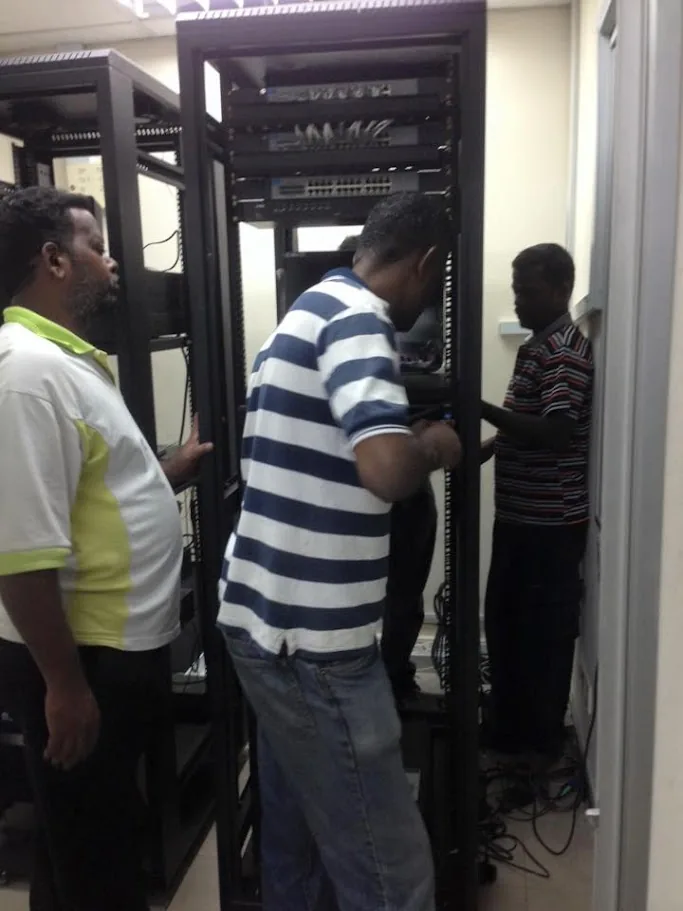
Your comms area or server cabinet is the heart of the network. Keep it in a cool, dust free, lockable spot with enough power and, ideally, a UPS to ride out short outages. Concentrating the router, switch, firewall and any on site server in one tidy rack makes the whole setup easier to secure, maintain and support. If you are also installing a rack and cabling, our onsite IT support team handles this end to end.
Network hardware: router, switch and firewall
At the centre of your office network sit three key devices. The router connects you to the internet. A managed switch fans that connection out to all your wired points and lets you segment traffic sensibly. A firewall sits between your office and the internet, inspecting traffic and blocking threats before they reach your computers. Consumer grade all in one boxes struggle in a business setting, so invest in proper business hardware here.
A business firewall is the single most important security device in the office. It filters malicious traffic, blocks risky websites, supports secure remote access for staff working from home, and gives you visibility into what is happening on your network. For a fuller explanation of what a firewall does and how to choose one, see our guide on the business firewall for Malaysian SMEs, then match the model to your team size and needs.
A managed switch is worth the small extra cost over an unmanaged one. It lets you separate networks, for example keeping guest Wi-Fi, CCTV and staff devices apart, and it makes the network easier to monitor and troubleshoot. Buy switches with a few more ports than you need today, because offices always grow, and running out of ports later means adding another switch in an awkward spot.
Wi-Fi that actually works across the office
Poor Wi-Fi is one of the most common complaints in new offices, and it is almost always a design problem rather than a product problem. A single router in the corner cannot cover a full floor with concrete walls, glass partitions and metal shelving. Proper coverage comes from placing business access points around the office so every desk, meeting room and corner gets a strong, consistent signal.
Business access points also handle many devices at once far better than a home router. In a busy office with laptops, phones, printers and smart TVs all connected, a consumer device quickly becomes the bottleneck. Separate your Wi-Fi into a staff network and a guest network so visitors never touch your internal systems, and hide or lock down any network that connects to sensitive equipment.
Plan Wi-Fi alongside cabling, because each access point needs a network cable back to the switch. Positioning them correctly is part science and part experience, which is why a quick site survey pays off. Our detailed walkthrough of office network and Wi-Fi setup covers placement, channels and security in plain language if you want to understand the details before you commit.
Choosing your productivity platform
Almost every modern office runs on either Microsoft 365 or Google Workspace for email, documents, calendars and file sharing. Both are excellent cloud platforms, and choosing between them early matters because it shapes how staff work, where files live, and which tools you standardise on. Switching later is possible but disruptive, so decide before you set up mailboxes and start moving data.
Microsoft 365 suits businesses that rely on Excel, Word, PowerPoint and Outlook, and it includes Teams, SharePoint and OneDrive along with strong security and device management options. Our complete guide to Microsoft 365 explains the plans and features for Malaysian businesses. Google Workspace suits teams that prefer working in the browser and love real time collaboration in Docs and Sheets, covered in our Google Workspace guide.
Whichever you choose, buy the right licence tier from the start. The business plans include security, compliance and management features that the cheapest tiers leave out, and those features matter the moment you have staff, customer data and PDPA obligations to meet. Set up mailboxes, shared drives and permissions properly on day one rather than patching them together as you grow.
Computers, laptops and peripherals
Your team needs the right devices to do their work, and the cheapest option is rarely the most cost effective. A slow computer wastes minutes every hour, and those minutes add up to real money across a full team over a year. Match the hardware to the role: general office staff need reliable everyday machines, while designers, engineers and video editors need more powerful specifications and more memory.
Decide between desktops and laptops based on how people work. Fixed roles like reception or accounts often do well with desktops, which offer more performance per ringgit and are harder to walk out the door with. Staff who move between sites, attend client meetings or work from home need laptops. Standardising on a small number of models makes support, spares and imaging much simpler down the line.
Do not forget the peripherals that make a desk usable: monitors, keyboards, mice, headsets for calls, docking stations for laptop users, and enough power points and cable management to keep things tidy. Buying business grade equipment with proper warranties costs a little more upfront but reduces failures and downtime. If budget is tight, well chosen refurbished business machines can be a sensible middle ground.
File storage: cloud, NAS or both
Where your files live is one of the most important decisions in an office setup. The simplest modern approach is cloud storage through Microsoft 365 or Google Workspace, which keeps files accessible from anywhere, syncs across devices, and removes the need to manage your own hardware. For many SMEs this is all they need, and it fits naturally with staff who split time between the office and home.
Some businesses still benefit from a network attached storage device, or NAS, in the office. A NAS gives you fast local access to very large files, a central place for shared folders, and a private space for data you prefer to keep on site. It is popular with design studios, clinics, engineering firms and anyone handling big files daily. Many offices run a hybrid: cloud for collaboration, NAS for heavy local storage and backups.
Whatever you choose, set up folder structures and access permissions deliberately from the start. Decide who can see and edit what, keep sensitive HR and finance folders locked down, and avoid the free for all where everything sits in one shared drive with no controls. A tidy, well governed storage layout on day one prevents years of confusion and quiet data leakage.
Backup and disaster recovery from day one
Backup is the step new offices skip most often, and it is the one that hurts most when something goes wrong. Hardware fails, laptops get stolen, staff delete the wrong folder, and ransomware can encrypt everything in minutes. Cloud platforms are resilient, but they are not a substitute for real backup, because a deletion or an attack can propagate through synced files just as fast as it appears.
A solid approach follows the 3-2-1 principle: keep at least three copies of your data, on two different types of media, with one copy kept off site or in a separate cloud. Backups should run automatically on a schedule, be monitored so you know they actually completed, and be tested by restoring files occasionally. A backup you have never tested is only a hope, not a safety net.
Set this up during the office build, not after your first scare. Our guide to backup and disaster recovery explains how to protect Microsoft 365, servers, NAS devices and endpoints together, and how to plan a recovery time that matches how long your business can realistically survive without its systems. Building backup in from day one costs little and protects everything.
Cybersecurity essentials for a new office
Cybercriminals do not skip small businesses. Automated attacks scan the internet constantly and hit whoever is unprotected, regardless of size or industry. A new office is a chance to build security in from the start rather than bolt it on later. The essentials are not expensive or complicated, but they need to be in place before staff start handling real customer data and email.
Start with the basics that stop the majority of attacks: a business firewall, reputable endpoint protection on every computer, automatic updates for operating systems and software, and multi factor authentication on email and cloud accounts. MFA alone blocks the vast majority of account takeover attempts, and it is one of the highest value, lowest cost controls you can enable across the whole team on day one.
Layer in good habits and clear policies alongside the technology. Train staff to recognise phishing, set strong unique passwords through a password manager, and limit who has administrator rights. Our cybersecurity services page outlines how these pieces fit together for Malaysian SMEs. Security is not a product you buy once, it is a set of layers and habits you maintain, so plan for it as an ongoing part of the business.
Endpoint management and device control
Once you have more than a handful of computers, managing them one by one becomes a real burden. Endpoint management tools let you see every device from one dashboard, push updates and security patches automatically, deploy software, and enforce policies such as disk encryption and screen locks. For a growing office, this is the difference between IT that scales smoothly and IT that becomes chaos.
Patch management deserves special attention because unpatched software is behind a huge share of real world breaches. When a serious vulnerability becomes public, attackers begin scanning within hours, so the businesses that patch quickly and consistently are far safer. A managed endpoint platform closes that window automatically instead of relying on staff to remember to update, which they rarely do.
Tools like ManageEngine Endpoint Central give SMEs enterprise grade control at an accessible price, covering patching, software deployment, remote troubleshooting and asset tracking. Our guide to ManageEngine Endpoint Central explains how it works and who it suits. Setting this up while your fleet is small makes onboarding new staff and new devices painless as you grow.
Printers, phones and other office equipment
Beyond computers and networks, most offices need shared devices that also have to be set up correctly. Network printers should be configured with fixed addresses, sensible sharing, and secure release if you print confidential documents. Position them where they are convenient but not disruptive, and make sure consumables and drivers are sorted before day one so nobody spends the first morning fighting a printer.
Business phone systems have largely moved to internet based voice, which runs over the same network as everything else. That is convenient and flexible, letting staff take calls on laptops and mobiles, but it means your network and internet line need to be solid enough to carry clear voice alongside data. Plan phones as part of the network design rather than treating them as an afterthought.
Think about the other equipment that quietly depends on the network too: CCTV cameras, door access systems, meeting room displays, and payment terminals. Each one is a device on your network that needs an address, a segment and, in some cases, its own security considerations. Listing them all during planning avoids the scramble of discovering forgotten devices on move in day.
PDPA and data protection responsibilities
Every Malaysian business that handles personal data has obligations under the Personal Data Protection Act, and a new office is the ideal moment to build good data practices in. You are collecting and storing customer names, contact details, and often more sensitive information, and you are responsible for keeping it secure and using it lawfully. Setting this up properly from the start is far easier than retrofitting compliance later.
In practical terms, that means controlling who can access personal data, securing the systems where it lives, keeping backups, and being able to respond if data is lost or breached. Many of the technical steps in this checklist, such as access controls, firewalls, MFA and backup, are also exactly what PDPA good practice calls for, so a well built office naturally supports compliance rather than working against it.
Document your basic policies too: how data is collected, where it is stored, who can see it, and how long you keep it. Staff should understand their part in protecting information, because most data incidents involve human error rather than sophisticated hacking. A short, clear policy plus the right technical controls puts a small business in a strong position without heavy cost or bureaucracy.
Deciding who supports it all
Once the office is set up, someone has to keep it running. Computers slow down, printers jam, staff forget passwords, updates need applying, and occasionally something breaks at the worst possible moment. For most Malaysian SMEs, hiring a full time in house IT person is hard to justify until the team is quite large, so the practical choice is usually a managed IT partner or a mix of both.
Managed IT means an external team monitors and maintains your systems, applies updates, handles security, and answers support requests, usually for a predictable monthly fee. Cybergate provides managed IT support on a monthly retainer, which is far less than a salaried hire and gives you a whole team rather than a single point of failure. For a full comparison of the options, see our guide to IT support in Shah Alam.
For businesses that mostly need occasional hands on help, onsite support on demand is a good fit. Cybergate onsite visits start per visit. Many SMEs combine a managed plan for day to day monitoring with onsite visits for physical work, getting reliable coverage without the cost of a full internal IT department.
Your new office IT setup timeline
Timing is where many office moves come unstuck, so work backwards from your target opening date. Order your internet line and any long lead time hardware first, because these are the items most likely to delay everything else. Confirm the floor plan and cabling design next, then schedule the cabling and comms cabinet work before furniture and staff arrive.
With cabling in place, install and configure the network hardware, firewall and Wi-Fi, then set up your cloud platform, mailboxes and file storage. Prepare and image the computers, install security software, and enrol devices into endpoint management. Aim to have all of this done and tested at least a few days before move in, so any surprises surface while the office is still empty and easy to work in.
Finish with the things that make day one smooth: test every desk network point, confirm Wi-Fi coverage in every room, print a test page, send a test email, and check that backups are running. A short walk through with your IT partner before staff arrive catches the small issues that would otherwise turn opening morning into a stressful scramble. A calm, working first day sets the tone for the whole office.
Key takeaways
Setting up IT for a new office in Malaysia is straightforward when you do it in the right order and plan before you buy. Get the foundation right, network, cloud, security and backup, and everything above it runs smoothly for years.
- Plan first: map staff, rooms, devices and how the business works before buying anything.
- Order the internet line and long lead hardware early to avoid delaying your opening.
- Invest in structured cabling, a business firewall, a managed switch and proper Wi-Fi coverage.
- Choose Microsoft 365 or Google Workspace early and buy the right licence tier from the start.
- Set up automated, tested backup and basic cybersecurity, including MFA, on day one.
- Decide your support model early: managed IT on a monthly retainer, or onsite per visit.
If you are opening or moving an office in Shah Alam, the Klang Valley or Melaka and want it done right the first time, Cybergate can plan, build and support the whole setup. A short free consultation early in your move saves time, money and stress later, and gives your team a clean, reliable IT foundation from their very first morning.
Need help with this?
Cybergate provides IT support, cybersecurity, Microsoft 365 and SEO for Malaysian businesses. Free consultation, no obligation.
Get Free Consultation WhatsApp UsKartik Periasamy
Kartik Periasamy is the founder of Cybergate Technology Malaysia, with more than 13 years in IT and technology including a Subject Matter Expert role at Dell. He now leads SEO, AI search and web strategy for businesses across Malaysia and Singapore.